
This post will provide a step by step guide to fixing the issue of customer receiving PDF files sent form Gtrak3 as .DAT files.
This is a known issue with interpretation of PDFs sent from Outlook to Thunderbird. There is an Add-on available in Thunderbird to resolve this issue. Please follow the steps below:
Note: Different versions of Thunderbird may present options slightly differently or be available in different location. Key words are highlighted in red to make it easier to find the correct option.
Step 1. Locate Add-on screen
The Add-on screen is typically located under Tools > Add-ons. But this is not always the case. It may be accessible via main options OR you can search for it in the search field.
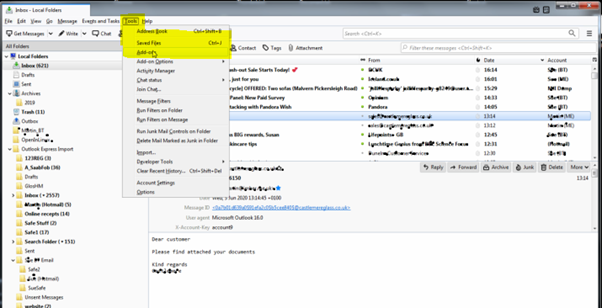
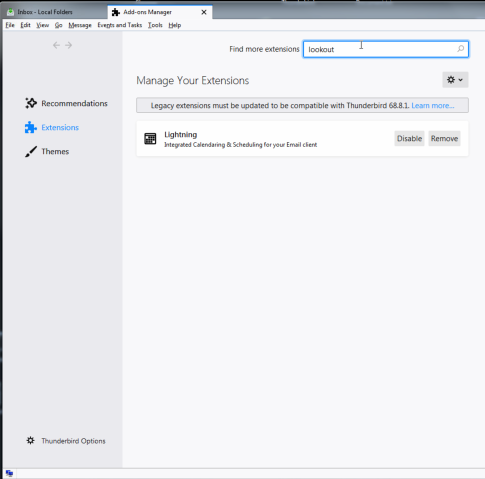
Step 2. Add-ons Manager - Locate "Lookout" Add-on
Once you are in the Add-on Manager or screen you can either search for LookOut (fix version) add-on in the "find more extensions" search or any other titled search. OR you can scroll through the list of available add-ons until you locate the LookOut (fix version) add-on.
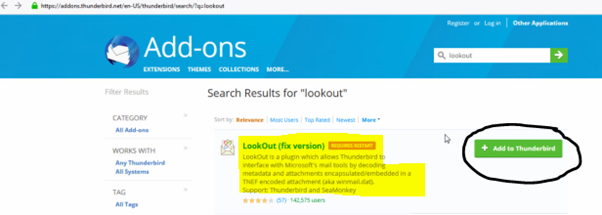
Step 3. Install the "LookOut (fix version)" Add-on
Select the "Add to Thunderbird" option or install using the relevant install / run / add button that is presented to action the install.
Note: Follow the necessary instructions to install the add-on.
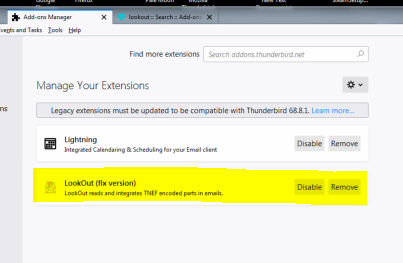
Once the install has taken place. You can check the success of the install. Lookout (fix version) should now be installed and visible in the Add-ons list.
Step 4. Check previous emails with .DAT files in your inbox or sent folder.
All emails that should have been PDF files but displaying as .DAT files should now be shown as PDF and viewable using a PDF viewer.
Comments
0 comments
Article is closed for comments.