
If GTrak has been recently installed on a new machine sometimes barcodes may not be generating as intended. There can be a number of reasons what may have caused this issue such as your printer running out on memory but the most common reason tends to be the barcode font has not been installed.
Topics covered in the article
- Installing the font
If barcodes are not generating this should be your go to option initially. First you have to find the font.
- Locate your Gtrak3 Icon, this maybe on your desktop or attached to your taskbar/start menu.
- Once located, right click and open file location this will take you to where GTrak is stored on your machine. Make sure you DO NOT you touch these files as moving/deleting them can potentially break GTrak.
- If you organise your folder by name in ascending order (A-Z) and scroll to the very top you will find a “REPORTS” folder. Enter in that folder.
- Within the “REPORTS” folder, if you organise the folder by name in ascending order again and scroll down to B you should see Barcode TrueType font file.
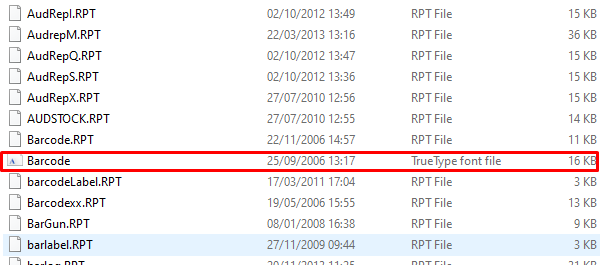
Now you have located your font it’s time to install it. You will need administrative permission for this step, so make sure you are the PCs admin or know the admin login details to allow you to install the font.
- Right click on the font
- Click on “Install for all users”
- You will then get a prompt saying if you want to allow this app to make changes to your machine.
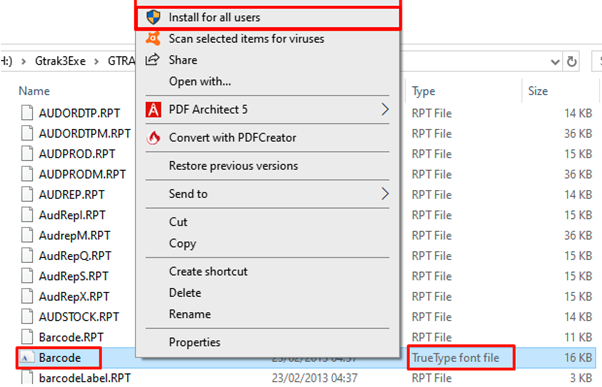
- If you are the admin user there will be 2 buttons at the bottom of the prompt displaying ‘Yes’ or ‘No’. Simply click ‘Yes’ and the font will install.
- If you’re not the admin user then it will ask you to enter the admin login details. Once entered press ‘Yes’ and the font will install.
- Once the install has completed, you are all set up. You have successfully installed the font and should now be generating barcodes within Gtrak.
9 out of 10 times this will resolve the issue with barcodes not generating in the rare case that it does not resolve your issue feel free to submit a new ticket and we can assist you further.
Comments
1 comment
Need to run CMD as Admin
Delete file C:\windows\fonts\zeb*.*
Dir file first
NEEDS REBOOTING
Please sign in to leave a comment.